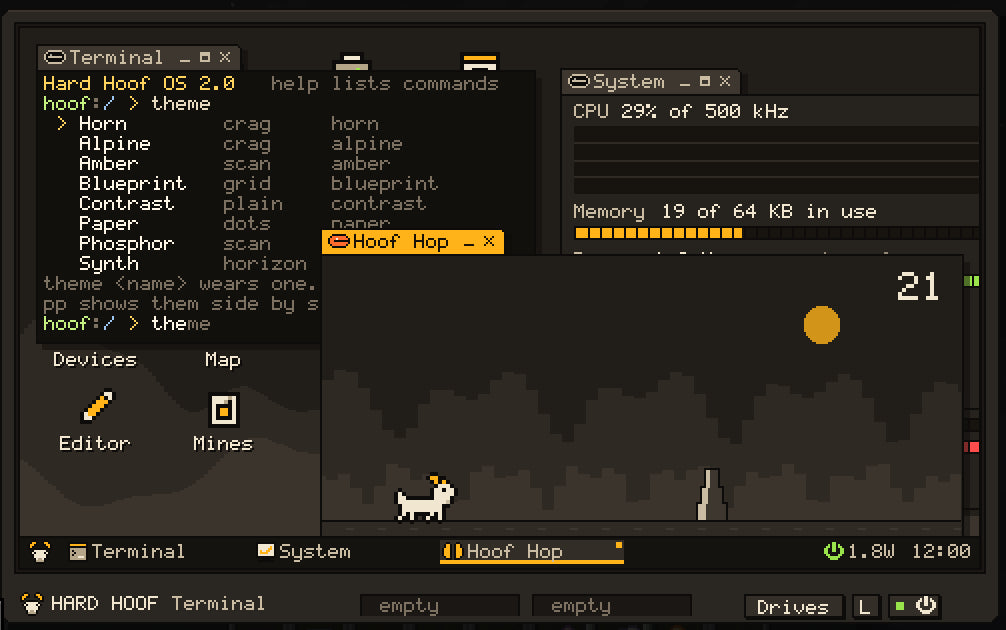
Implemented as a Java kernel + ROM userland (Hard Hoof OS 2.0; it was called VoltOS
before 2.0). The pixel desktop is what the client shows for a powered Terminal, or a
rack computer on a Console.
Hard Hoof OS boots when the Terminal has power and the front switch is on. The client never runs programs: it mirrors windows and sends input; the server owns processes, the file system, and drawing.
Boot
- Power online → POST (HOOF BIOS 2.0, about 44 ticks): drive lines for
rom0,flash0, bay media. -
/rom/sys/init.voltruns. On a new computer it creates/homeand seedshello.voltandreadme.txt. - Init launches Setup for a new computer, asking for its name, your login, and your company.
On a configured computer with its lock enabled, it starts login instead. It also launches
/startup.voltif you have created one. Init also startsremoted, the remote-access service (new in the development build; see The web & remote access). -
RUNNING. Apps are scanned from
/rom/apps,/apps, and each disk's/apps.
Power loss stops every process. Files on drives remain.
The screen
| Element | Behavior |
|---|---|
| Resolution | 480×270; dock 16 px at the bottom; window tabs 14 px |
| Desktop icons | Double-click to open an app. Right-click the desktop for more. |
| The Horn |
Ctrl+Space, the goat at the bottom left, or just start typing on the desktop. Type part of an app, a command, an open window, a theme, or a sum (12*(3+4) shows 84; Enter copies it). Enter opens or runs the top match; Tab fills a name in. |
| Dock | Open windows; click to focus or restore |
| Window tab | Drag to move; the eye shows what the program is doing; minimize, maximize, close |
| Snapping | Drop a window on a side for half the screen, in a corner for a quarter, at the top for all of it. Ctrl+Alt+arrows do the same. Ctrl+Tab brings the next window up. |
| Esc | Closes the Horn or a menu first; then leaves the screen (the OS keeps running) |
| Drives drawer | Case button under the bezel: disks in bays 1-2, and the CPU, memory and network sockets |
| Toasts |
sys.notify messages |
At most 24 windows. The focused window gets keys and mouse.
The eye on each tab
| Eye | The program is |
|---|---|
| Open, still | waiting for you (input) |
| Glancing side to side | working |
| Half shut | waiting on a device or a timer |
| Red | using its full instruction budget; inspect the program if the computer is busy |
Themes
A theme sets every colour, the wallpaper, and the terminal's 16 colours. Shipped: Horn (the default), Paper, Phosphor, Amber, Blueprint, Alpine, Synth, Contrast.
- The Appearance app: pick a theme and the whole screen changes at once; Keep makes it stay after a restart, and closing without keeping puts the old one back.
-
themelists them;theme <name>wears one. The Horn finds them by name too. - Your own: copy one from
/rom/themesto/etc/themesand change it. Every running app repaints when the theme changes;/etc/themeremembers it across reboots.
App model
An app is a .volt file whose first line is:
// @app Display Name | icon
| Location | Role |
|---|---|
/rom/apps |
Factory apps (read-only) |
/apps on flash |
Your apps |
/disk/apps, /disk2/apps
|
Apps carried on removable media |
Launch: a desktop icon, the Horn, the app's name at the shell, open, or proc.launch. Apps get
their own process and window. See Apps.
Process model
- Compile cache by path + content.
- 500 kHz: 25,000 instructions a tick, shared round-robin. Input runs the receiving program at once, so typing echoes on the same tick.
- Natives may suspend (events, sleep, input, child exit, device call). Device calls answer next tick; at most 32 a tick; ABI v1 (see Data bus).
- The screen syncs per viewer, sending only what changed.
Weather and time
The desktop clock shows local solar time where the computer stands. Programs read the weather with sys.weather,
sys.radar and sys.lightning, the sky with sys.sky, and the air and water round the computer with sys.env. The
Weather and Sky apps and the weather command show them. These came with 0.6.0.
Running while you are away
Computers keep running when their chunk unloads, and a server restart resumes every program instead of rebooting. A single registry steps every Terminal, rack bay, Router and Exchange once a tick, loaded or not, and idle ones sleep until something happens. While unloaded:
- Files, drives and chips work on copies of what is in the slots, and the network works.
- A device in an unloaded chunk answers
offline: <label> is not loaded. It stays listed. -
sys.skyandsys.envanswer nothing;sys.surveyandsound.noteare refused. - A drawing too big to save is saved blank, and the program is told to redraw when you return.
Power: in 0.6.0 an unloaded computer ran on its own charge (about 30 seconds idle for a Terminal). In the development build one on a factory's copper wire is fed by that wire as if you were there, and keeps running for as long as the wire has power. See Terminal.
The web and reaching it from outside
New in the development build. An Internet Dish gives a computer the real web through the Browser app, web and
fetch. Every computer also has an Inter-Dimensional Address; /rom/sys/remoted.volt, started at every boot, lets
Hard Hoof Studio log in with a code from remote pair. All of it is Volt that you can read and change. See
The web & remote access.
Neural Link
With a Neural Link implant, J opens the last Terminal you used from anywhere in its world (see Terminal).
Not in yet
| Topic | Reality |
|---|---|
| True GPU / 640×480 | Planned hardware contract only; the framebuffer is 480×270 software windows |
| Volt-written kernel | Planned; today the kernel is Java |