Built-in apps ship in /rom/apps with Hard Hoof OS. Each is plain Volt with an
@app header; you can read, copy, and change any of them. Browser and Remote are new in the development build, not in the 0.6.0
download. Pressure and Weather came with 0.6.0.
Hard Hoof OS treats apps as processes that own windows. Open one from its desktop
icon, the Horn (Ctrl+Space), by typing its name in the shell, with open, or with
proc.launch. Every app draws with the theme's colours, so a theme change repaints it.
Shipped apps
| App | File | What it is |
|---|---|---|
| Terminal | terminal.volt |
The shell window |
| Files | files.volt |
Drive browser |
| Editor | editor.volt |
Text and Volt editor |
| Help | help.volt |
Opens the guide in the Editor |
| System | system.volt |
CPU, power, processes, drives |
| Appearance | appearance.volt |
Themes |
| Storage | storage.volt |
Item Tanks, and crafting on an Assembler |
| Research | research.volt |
A Research Lab's research |
| Worlds | worlds.volt |
Plan and make worlds on a Dimension Creator; lead a Gateway to them |
| Printer | printer.volt |
A Matter Printer's field, a layer at a time: break, mine, place |
| Zone | zone.volt |
A Zone Projector's zone and rules |
| Devices | devices.volt |
Every machine this computer reaches: its state, what programs can ask it, a way into its app |
| Browser | browser.volt |
Real web pages as text, through an Internet Dish; the manuals as pages with no dish |
| Remote | remote.volt |
This computer's Inter-Dimensional Address, a pairing code for Hard Hoof Studio, and who is connected |
| Pressure | pressure.volt |
Connected pressure chambers, gas blenders, and airlocks |
| Pile | pile.volt |
A Graphite Pile's state, control rods, and shutdown controls |
| Weather | weather.volt |
Local weather, radar, and forecast |
| Hoof Hop | hop.volt |
A goat runs the crags |
| Mines | mines.volt |
Clear the field without opening a mine |
| Stack | stack.volt |
Falling blocks |
| Sketch | sketch.volt |
Pixel art |
| Beats | beats.volt |
A drum machine and melody maker on the speaker |
| Calc | calc.volt |
Sums, with a tape |
| Sky | sky.volt |
Time, weather and the moon over the computer |
| Map | map.volt |
The ground around the computer from above |
Disk or /apps apps appear on the desktop and in the Horn when present.
Terminal
Opens a TTY and runs /rom/lib/shell.volt. As you type, what fits is listed under the line; a
command turns green once it names a program; an earlier line that starts the same way shows faintly
after the cursor (Right takes it). See Shell.
Files
Browse drives with a sidebar and a file list. Double-click opens a folder, or a file in the Editor;
right-click for more. Read-only /rom entries cannot be changed in place. See Drives.
Editor
Volt syntax colours from the theme's terminal palette. Ctrl+S save, Ctrl+R save and run in a new Terminal, Ctrl+Z undo, Ctrl+C / X / V copy, cut, paste lines, Ctrl+G go to line.
System
CPU load graph, power and charge, the process table with End task, drive meters.
Appearance
Pick a theme and the whole screen changes at once; Keep makes it stay after a restart, and
closing without keeping puts the old one back. Make my own copies a theme to /etc/themes and
opens it in the Editor.
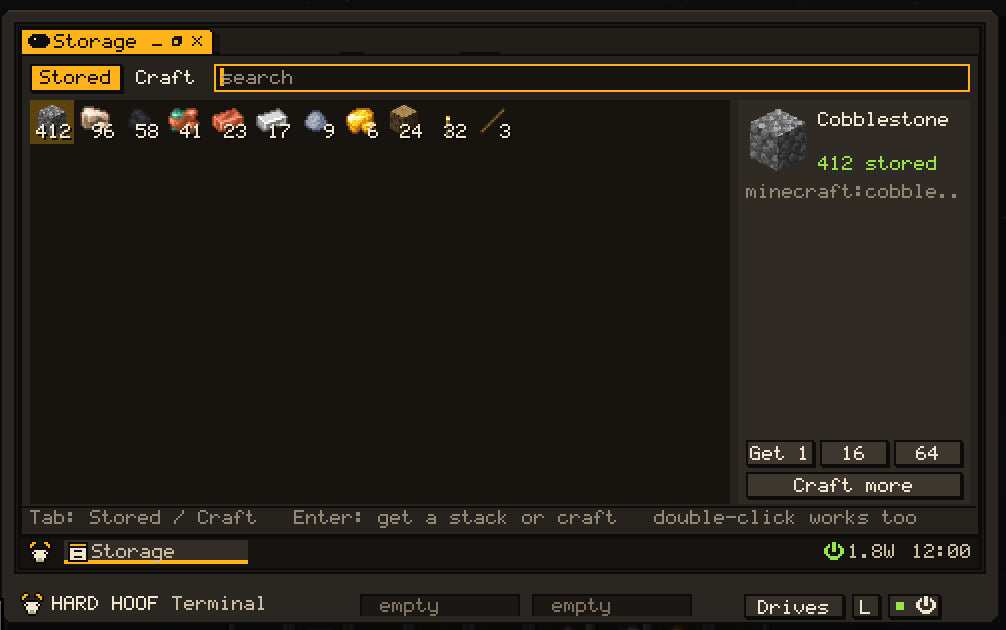
Storage
Needs an Item Controller (touching the computer, or on a Data Cable) piped to Item Tanks and to two named chests (input and output).
| Tab | Behavior |
|---|---|
| Stored | Grid of items; search; pick one, then Get 1 / 16 / 64 to the output chest |
| Craft | What the Assembler can make; it plans every step and makes the parts first |
Research, Worlds
Research drives a Research Lab (pick, Start, Write to disk). Worlds plans a world on a Dimension Creator with a live map, makes it, and leads a Gateway's doorway to it.
Printer
The Matter Printer's field from above, a layer at a time, with ore in the colour of what it gives. Scroll (or click the gauge) to go up and down. Click a block: Break takes it into the printer's store; Mine all takes every one like it in the field, at the printer's pace. Pick an item in the store and an open spot, and Place puts it there. Show the field in the world lights its edges for eight seconds. Reading a layer costs 0.1 J a block.
Zone
The Zone Projector's zone to scale. Drag across the plan (or scroll over it) to size it. Click a sprout for that step of growth; switch No spawns and Low gravity; each rule shows what it draws. Nights runs the night service: spawns off and growth from dusk to dawn.
Devices
Every machine this computer reaches, touching it or on its Data Cables, with a dot for what each is doing (green working, red stopped, faint idle). Pick one for its state now (joules and watts in their units) and every operation a program can ask it, with what each does. Open goes to its own app when it has one (Printer, Zone, Worlds, Storage, Research, Browser). Click its name to rename it; the name then works anywhere an id does.
Browser
Needs an Internet Dish (touching the computer, or on a Data Cable) with power: 2 W on, 8 W while it fetches. The dish fetches and decodes each page; the Browser keeps only the part near the screen, so long pages fit a 64 KB Terminal (about 4 tabs and 3 pictures at a time; more RAM keeps more).
| Action | How |
|---|---|
| Go to an address, or search | Ctrl+L, type, Enter (words that are not an address search the web) |
| Follow a link | Click; middle-click opens it in a new tab; right-click to open or copy it |
| Back / forward / reload | Alt+Left (or Backspace) / Alt+Right / F5 or Ctrl+R |
| Tabs | Ctrl+T, Ctrl+W, Ctrl+PageDown / Ctrl+PageUp |
| Bookmarks, history |
Ctrl+D or the star; Ctrl+H. Both live in /home/.browser
|
| Find in page | Ctrl+F, then Enter (Shift+Enter goes back) |
| Walk the links and fields | Tab / Shift+Tab, then Enter |
Forms work (text fields, boxes, lists; GET and POST), and pictures arrive as small tiles once they scroll into view.
about:home lists bookmarks and recent pages, about:help shows every manual as pages with no dish at all, and
about:history lists what you opened. In a Terminal, web <address> opens the Browser, fetch <address> prints a
page (-r the raw body, -h the status), and open understands addresses. Programs use /rom/lib/web.volt;
man web and man api (Internet Dish) have the details. The Browser is new in the development build; the dish,
limits and server settings are in The web & remote access.
Remote
Shows this computer's Inter-Dimensional Address (IDA) in large type, a Pair button that sends a one-use code for
Hard Hoof Studio to your chat (never to the computer), and the list of people connected, with a button to
end a session. It does what the remote command does. Needs an Internet Dish on the computer's cables; see
The web & remote access.
Pressure, Pile, Weather
Pressure runs the pressure chamber, gas blender and airlocks the computer reaches. Pile drives a Graphite
Pile: control rods, SCRAM, reset and hold. Weather shows a rain radar with range tabs and a forecast; the desktop clock shows local solar time. The weather, pressure and pile commands do the same from
a shell.
The toys
- Hoof Hop: Space, Up or a click jumps; jump again in the air for a second hop. The best five runs are kept with the runner's name.
- Mines: left opens, right flags, a click on a number whose flags are all down opens the rest around it. The eye starts a new field; the tabs pick its size.
- Stack: Left and Right move, Up turns, Down drops faster, Space drops at once, P pauses.
-
Sketch: draw with the left button in one colour and the right in another. Pen, Fill, Line
and Pick; Ctrl+Z undoes. Pictures save as
.pixfiles. - Beats: click a square to put a note on that step; right-click a lit square to raise it. Space plays and stops; the slider sets the tempo; keys A to K play the melody row by hand. Everyone nearby hears it.
- Calc: Enter works out a sum; every answer goes on the tape, click one to use it again.
- Sky: the time, the weather, the moon, and how long until night (and mobs) or morning.
- Map: the ground around the computer, 49 blocks across; Heights paints it by height.
Add your own app
- Write
/apps/greeter.volt(or/disk/apps/...):
// @app Greeter | app
let ui = import("ui")
let w = win.open("Greeter", 160, 40, {icon: "app"})
draw.clear(w, ui.theme.window)
draw.text(w, 8, 12, "Hello from Hard Hoof", ui.theme.text)
draw.present(w)
while true {
  let e = event.wait()
  if e.type == "closed" { exit() }
  if e.type == "theme" {
    draw.clear(w, ui.theme.window)
    draw.text(w, 8, 12, "Hello from Hard Hoof", ui.theme.text)
    draw.present(w)
  }
}
- It appears on the desktop and in the Horn at the next scan (saving to
/appsrescans). - Icons: shipped names (
app,volt,gear,map,hoof, ...) are listed inman api.