New
Module: Hard Hoof: Tech (hardhoof_tech)
Reality devices are machines on the computer bus that act on the world itself. A computer drives them like any other device, so reprogramming the world is Volt code. Every edit costs joules, and they work at a fixed pace: a factory's worth of power, and minutes rather than a freeze.
| Device | What it does |
|---|---|
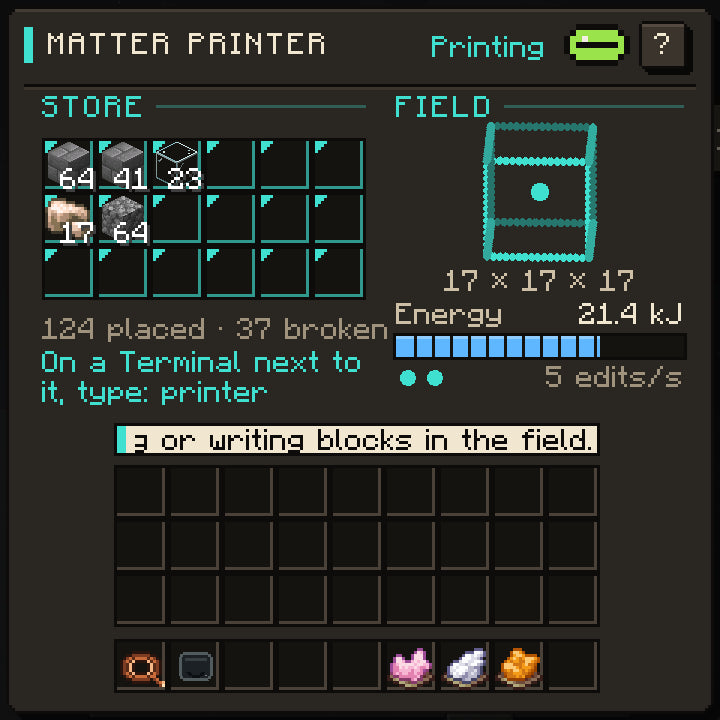
| Matter Printer | Reads and writes blocks in a field around it. |
| Zone Projector | Holds rules in a zone: growth, spawns, gravity. |
| Dimension Creator | Makes whole worlds. |
| Gateway | Opens a doorway into them. |
None of them has controls of its own. Put a Terminal next to one, or join them with a Data Cable, and drive it with a command or its app.
Matter Printer
Your first print: find ore with a computer, then mine it without a pickaxe.
- Place a Matter Printer below ground and wire DC power to its back.
- Put a Terminal next to it (or run a Data Cable from it).
- On the Terminal type
printer survey. It counts every block within 8 of the printer. - Type
printer find iron_ore, thenprinter mine iron_ore. The ore lands in the printer's store.
printer fill builds boxes from its store, and printer save and printer print copy builds as
blueprint files. The Printer app shows the field a layer at a time, ore in its own colours:
click a block, then Break, or Mine all to take every one like it.
How the printer works
| Quantity | Value |
|---|---|
| Field | The 17-block cube centred on the printer. 0 1 0 is the block on top. |
| Speed | At most 5 blocks placed or broken a second |
| Place stone | About 14 J (harder blocks cost more) |
| Break stone | About 19 J |
| Survey | 0.1 J a block |
It never takes blocks that hold things (chests, machines) or unbreakable blocks. Read
/rom/bin/printer.volt: it is a short program, and yours can do more.
Recipe
Built in the Machine Workshop.
L P E P L
W P D P W
P P B P P
| Symbol | Ingredient | Count |
|---|---|---|
L |
Logic Board | 2 |
P |
#c:plates/iron |
7 |
E |
Ender Pearl | 1 |
W |
#c:wires/copper |
2 |
D |
Diamond | 1 |
B |
Power Board | 1 |
Result: hardhoof_tech:matter_printer ×1
Zone Projector
A farm that grows fast and stays safe at night:
- Place a Zone Projector in the middle of your farm and wire DC power to its back.
- Put a Terminal against it, or join them with a Data Cable.
- Open the Zone app: drag across its plan to size the zone, click the sprouts for growth, and
switch No spawns on. Or type
zone growth 4, thenzone spawns off. - Or type
zone night: a small program turns the rules on at dusk and off at dawn, so you only pay for the night.
Rules draw power all the time they are on, more for a bigger zone. zone radius sets its size,
4 to 16.
Recipe
Built in the Machine Workshop.
A P L P A
W P B P W
P P M P P
| Symbol | Ingredient | Count |
|---|---|---|
A |
Amethyst Shard | 2 |
P |
#c:plates/iron |
7 |
L |
Logic Board | 1 |
W |
#c:wires/copper |
2 |
B |
Power Board | 1 |
M |
Bone Block | 1 |
Result: hardhoof_tech:zone_projector ×1
Worlds
The Dimension Creator makes worlds of your own, from a single chunk to a 256-chunk planet, and a Gateway holds a doorway open into them.