Module: Hard Hoof: Tech (hardhoof_tech)
Item pipes are dumb plumbing. An Item Controller moves stacks between anything the pipes flange onto; Item Tanks are the powered bulk store that controllers and the Assembler treat as "storage".
Copper Item Pipe
Workshop recipe, yields 16 pipes: 6 copper ingots and 3 glass blocks (hardhoof_tech:item_pipe_1 ×16). Pipes take no casing. The layout is in JEI. The 0.6.0 download used an older pattern with more copper.
Pipes auto-join neighboring pipes and flange onto inventories, tanks, controllers, and assemblers. They move nothing by themselves. In this alpha there is no separate wrench face-toggle on the pipe block — connectivity follows neighbors.
Item Tank 1:1
New in the development build: 1 Hearth Casing, 1 capacitor, 2 glass blocks and 2 chests make 2 tanks at the Workshop (hardhoof_tech:item_tank_1 ×2). The Fluid Tank is the same with 2 buckets instead of chests.
| Quantity | Value |
|---|---|
| Capacity | 16 items per block (any mix of types) |
| Idle draw | 0.25 W per block in the group |
| Power | Any face of any member |
| Merge rule | Orthogonal neighbors of the same ratio join into one store |
While the group cannot pay idle power it goes offline: contents stay, but inserts/extracts fail and the Storage UI shows the tank offline. Breaking a tank keeps its items on the dropped block (shulker-style). Right-click with items inserts into an online group; empty hand opens the group UI.
Item Controller
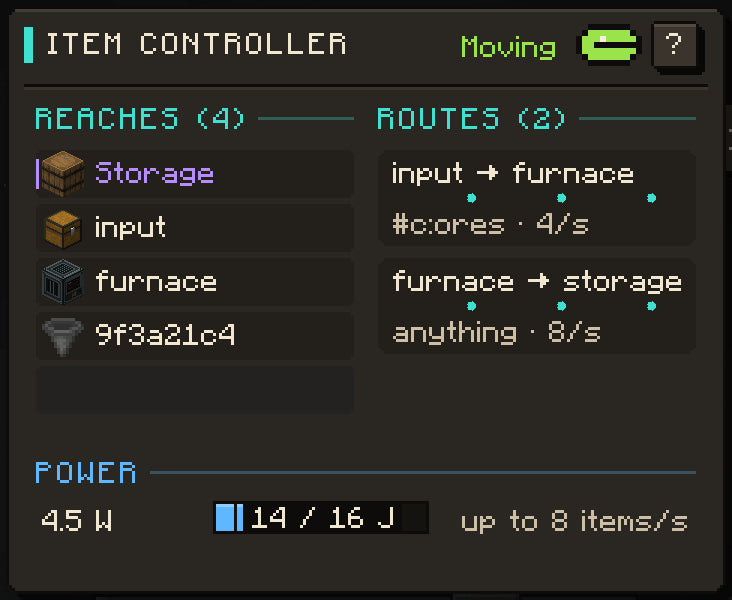
New in the development build: 1 Hearth Casing, 1 Motor, 2 Copper Contacts and 2 hoppers (hardhoof_tech:item_controller_1 ×1). The Fluid Controller takes 2 fluid pipes instead of the hoppers. See Tech tiers for casings and parts. The 0.6.0 download uses an older pattern; JEI shows your build's recipe.
| Quantity | Value |
|---|---|
| Move rate | up to 8 items / s (shared by routes and move) |
| Standing routes | 2 |
| Idle draw | 0.5 W |
| Cost | 1 J per item moved |
| Buffer | 16 J |
| Power terminal | Rear |
Every pipe face that flanges onto an item handler is an endpoint (vanilla chests, Tech machines, tanks, …). All Item Tanks on the grid appear together as the endpoint name "storage". Endpoints also have stable hex ids (Network Probe / Jade show the same id).
Device ops (item_controller)
| Op | Effect |
|---|---|
endpoints |
Blocks the pipes reach; "storage" is all tanks |
items |
Contents of an endpoint |
move |
Move up to N items now (from, to, count, optional filter id/#tag) |
add_route / route
|
Standing transfer (from, to, filter, per_second) |
routes / remove_route / clear_routes
|
Inspect or delete routes |
name / label
|
Name an endpoint block for scripts |
status |
Power, rate, endpoint and route counts |
Programs run from a Terminal on the data bus. A Network Probe right-click lists devices and pipe endpoints with copy buttons.
Storage app
ROM ships Storage (/rom/apps/storage.volt) and the storage command. They locate an Item Controller on the bus, show tank contents with search, pull 1/16/64 into a configured output chest, and can drive Assembler crafts through /rom/lib/craft.volt. Chest pairing is done in the app/storage setup flow. Terminal chrome and shell tutorials stay in the Terminal article cluster; this page only records that the app is real and controller-centric.
First loop
- Workshop pipes, two tanks, and a controller; cable 24 V into the controller rear and any tank face.
- Pipe tanks ↔ chests/machines; put the controller on the same pipe grid.
- From a Terminal: name endpoints,
add_routefrom a chest id to"storage", or use Storage to pull items out.
Common failures
- Controller: no pipes: not touching a pipe network or no flanged inventories yet.
- No power: rear dead on the controller; tanks offline without cable.
- Move returns 0: filter mismatch, empty source, full destination, rate budget, or not enough joules.
- Tanks will not merge: different ratio (only 1:1 exists in this alpha) or not adjacent.